Your own personal IaaS cloud.
Vmango turns your libvirt hosts into a small, self-hosted cloud. Choose a cloud image and instance type, add your SSH keys and launch it from your browser.
Read the documentation Quick start → Run with Docker →
Manage the machines you launch
- Create, start, stop and reboot virtual machines through libvirt.
- Provision from cloud images with SSH keys and cloud-init userdata.
- Create, clone, resize and attach storage volumes.
- Access serial and VNC consoles in the browser.
- Manage virtual machines across multiple local or remote libvirt hosts from one web interface.
Linux with QEMU/KVM is the main target. Local development on macOS is also possible with QEMU/HVF.
Run Vmango with Docker
The published image includes the web interface, libvirt clients, SSH and cloud-init ISO tools. It supports Linux amd64 and arm64; Docker selects the matching architecture automatically.
docker pull subuk/vmango:0.15.1Connect your existing libvirt hosts and keep application state in a persistent volume. Follow the Docker installation guide for configuration, host access and the required HTTPS proxy.
A clear view of your cloud
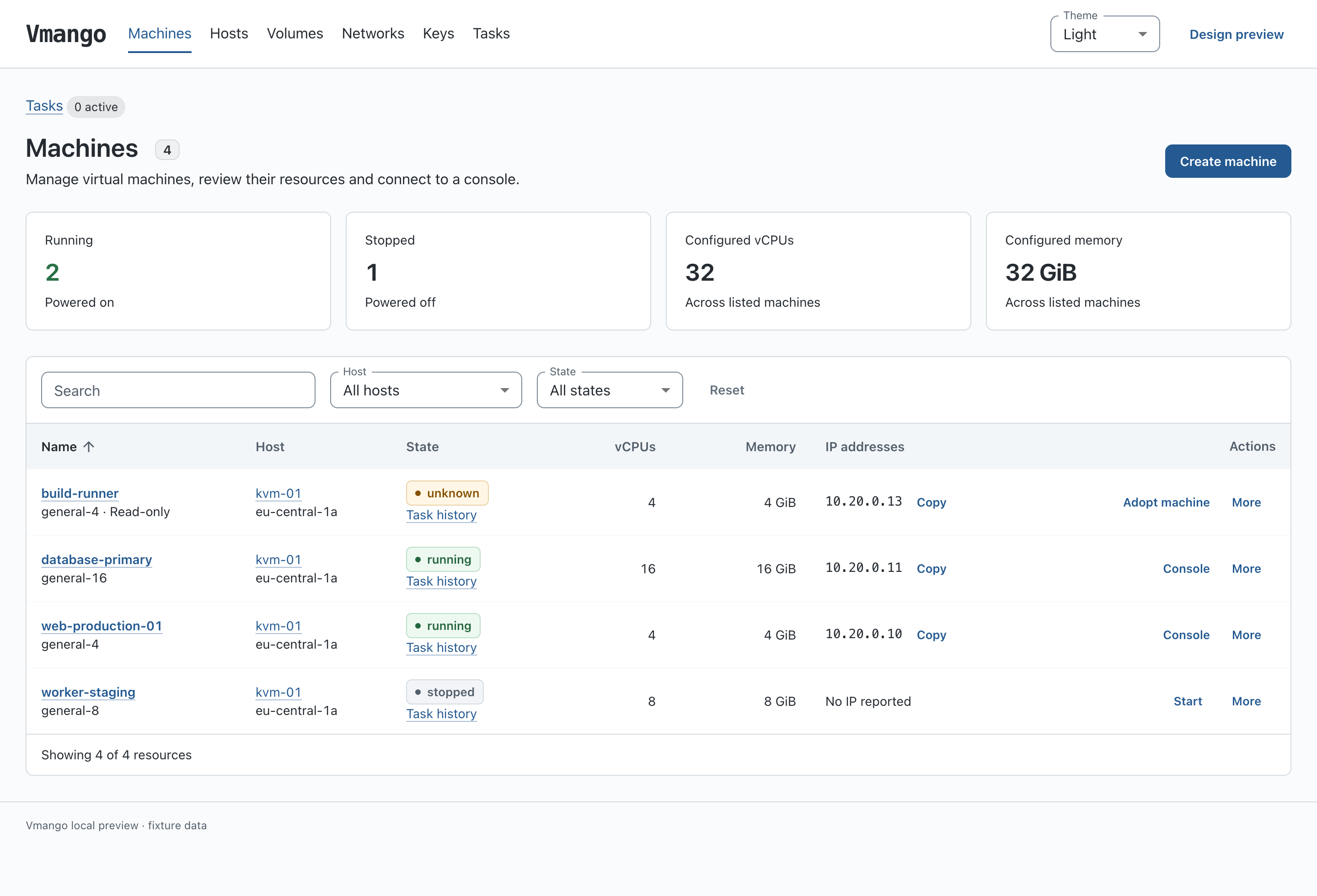
See machine states, allocated resources and IP addresses together. Filter by host or state, then open a machine to inspect its configuration or connect to its console.
See how machine creation works
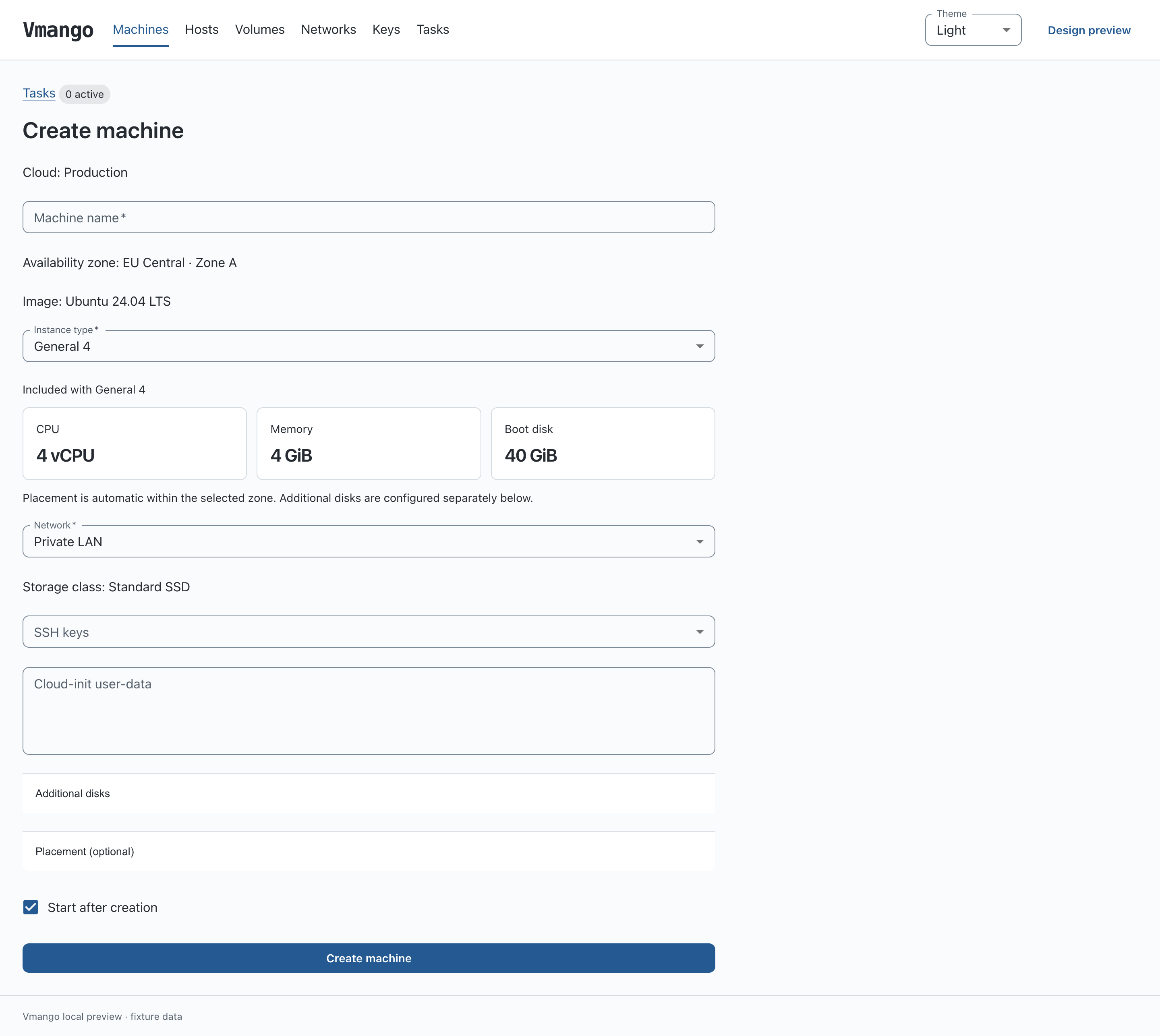
Select an image, availability zone and instance type. CPU, memory and boot disk size are shown before you launch. Add SSH keys and cloud-init data, and Vmango chooses a suitable host in the selected zone.
Define your cloud in a config file
Define instance types and configure each host inside its cloud, including its libvirt URI, logical network and storage-class bindings.
Replace the cloud "local" block in the
quick-start configuration with this example. Keep its image and API settings, including the
ubuntu-24.04-x86_64-bios image.
The host needs an active libvirt network and a writable storage pool,
both named default.
# Replace the quick-start cloud block; retain its nested images and API settings.
cloud "local" {
    name = "Local cloud"
    # Keep the nested image definitions from vmango.quickstart.conf here.

    zone "local" { name = "Local zone" }
    network "lan" { name = "Private LAN" }
    storage_class "standard" { name = "Standard storage" }

    instance_type "small" {
        name = "Small"
        cpu = 2
        memory_mib = 2048
        boot_disk_gib = 20
    }

    instance_type "medium" {
        name = "Medium"
        cpu = 4
        memory_mib = 4096
        boot_disk_gib = 40
    }

    host "local" {
        uri = "qemu:///system"
        config_drive_pool = "default"
        zone = "local"
        cpu_reserve = 1
        cpu_overcommit = 4
        memory_reserve_mib = 1024
        network "lan" { network = "default" }
        storage_class "standard" { pool = "default" }
    }
}
Vmango uses the catalog to offer compatible configurations and place machines automatically. Read the cloud configuration guide for multiple hosts, resource reserves and placement rules.
Development
Code, bug reports and contributions live on GitHub. If something does not work, please open an issue with your Vmango version, host setup and relevant logs.